古いシステムやSSL VPN環境の脆弱性が、権限昇格攻撃や不正アクセス試行の標的になる可能性があると報告されています。オンライン上の脅威が進化し続ける中で、VPNプロトコルは接続セキュリティ、プライバシー保護、ネットワーク安定性においてますます重要な役割を果たしています。異なるVPNプロトコルは、データの暗号化方法、接続の確立方法、そしてインターネット通信がネットワーク上でどれだけ安全に送信されるかに影響を与えます。このガイドでは、VPNプロトコルとは何か、一般的なVPNプロトコルと最適化プロトコルの違い、VPN Proxy Masterでプロトコルを切り替える方法、そして最新VPN技術が安全なブラウジングとリモート接続においてなぜ重要性を増しているのかを解説します。
Table of Contents
- VPNプロトコルとは?
- 一般的なVPNプロトコルとは?
- 最適化VPNプロトコルとは?
- VPNプロトコルの切り替え方法
- なぜ最新VPNプロトコルが重要なのか?
- VPN Proxy Masterを選ぶ理由
- セキュリティ向上のためにできること
- まとめ
VPNプロトコルとは?
VPNプロトコルとは、ユーザーのデバイスとVPNサーバー間でVPN接続をどのように確立するかを決定する技術標準です。
VPNプロトコルは以下を制御します:
· インターネット通信の暗号化方法
· データパケットの送信方法
· 接続速度と安定性
· セキュリティおよび認証方式
· 異なるネットワーク間での互換性
異なるVPNプロトコルは、異なるネットワーク環境やパフォーマンス優先事項に合わせて設計されています。強力な暗号化とセキュリティを重視するものもあれば、制限のあるネットワーク環境において速度、柔軟性、互換性を優先するものもあります。
一般的なVPNプロトコルとは?
多くのVPNサービスは、広く利用されている業界標準のVPNプロトコルをサポートしています。これらのプロトコルは、暗号化ブラウジング、リモートワーク、ストリーミング、公共Wi-Fi保護などで一般的に利用されています。
一般的なVPNプロトコル
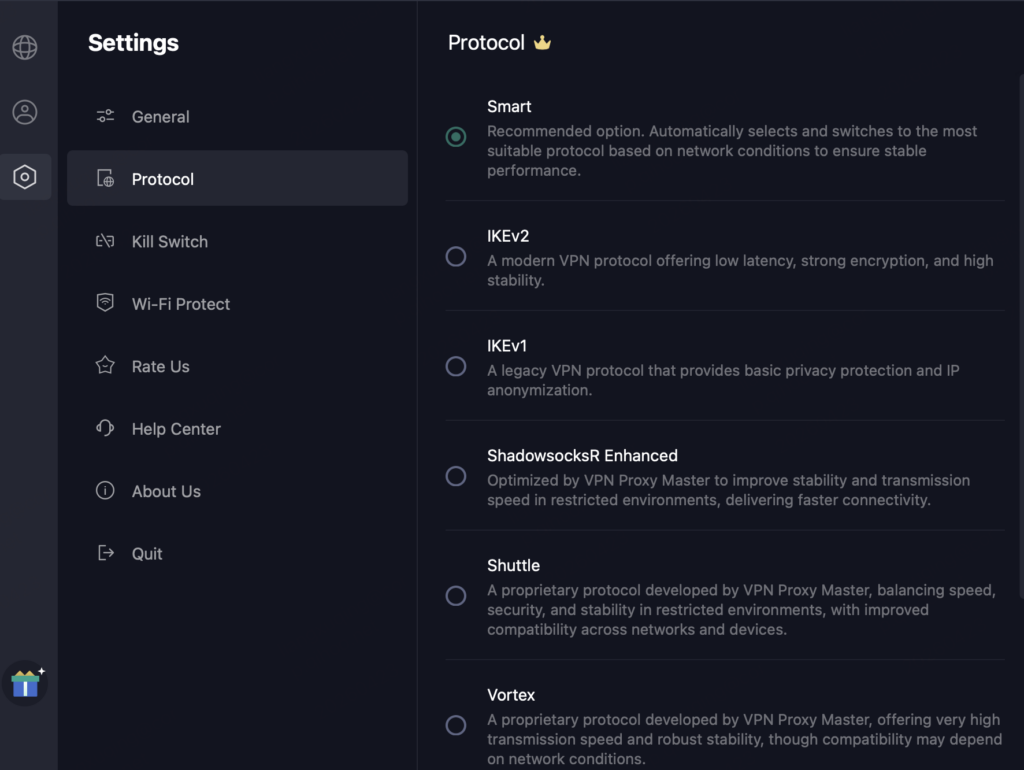
· IKEv1: 基本的なプライバシー保護とIP匿名化を提供する従来型のVPNプロトコルです。
· IKEv2: 低遅延、高度な暗号化、高い接続安定性を提供する最新のVPNプロトコルです。
· OpenVPN (UDP): 高速かつ低遅延の暗号化通信を提供しますが、利用可能なサーバーロケーションが限られる場合があります。
· OpenVPN (TCP): 非常に信頼性が高く、さまざまなネットワーク環境で安定した接続を維持します。
· OpenVPN: UDPの速度とTCPの信頼性を組み合わせ、高いセキュリティと柔軟性を実現します。
· Trojan: VPNトラフィックをHTTPS通信として偽装し、パフォーマンスとの引き換えにセキュリティとプライバシーを強化します。
· WireGuard: 軽量設計で非常に高速な通信を実現し、高度な暗号技術によって安全かつ効率的な接続を提供するVPNプロトコルです。
· V2Ray: 暗号化とトラフィック難読化を組み合わせ、制限のあるネットワーク環境に適しています。
· ShadowsocksR (SSR): 制限のあるネットワーク向けに設計され、トラフィック難読化機能を備えた暗号化トンネルを提供します。
ユーザーは、自身のネットワーク環境、接続設定、利用ニーズに応じて異なるVPNプロトコルを選択できます。
最適化VPNプロトコルとは?
一部のVPNプロバイダーは、制限された、または不安定なネットワーク環境下でのパフォーマンス向上のために、独自または最適化されたVPN技術を開発しています。VPN Proxy Masterには、一般的なプロトコルに加えて、異なるネットワーク環境における速度、互換性、接続安定性を向上させるために設計された複数の最適化プロトコルが含まれています。
最適化されたVPNプロトコル
· ShadowsocksR Enhanced: 制限のあるネットワーク環境での安定性と通信速度を向上させるために、VPN Proxy Masterによって最適化されたプロトコルです。
· Shuttle: VPN Proxy Masterが独自開発したプロトコルで、速度・セキュリティ・安定性のバランスを保ちながら、ネットワークやデバイス間の互換性を向上させます。
· Vortex: VPN Proxy Masterが独自開発したプロトコルで、非常に高速な通信速度と高い接続安定性を提供します。
· WireGuard Enhanced: 不安定なネットワーク環境での適応性能と接続安定性を向上させるために、VPN Proxy Masterによって最適化されたプロトコルです。
標準的なVPN技術とは異なり、最適化プロトコルは、現代の制限されたネットワーク、不安定なルーティング環境、変化する接続状況に特化して設計されていることが多いです。
📝 最適化プロトコルに加えて、VPN Proxy MasterはSmartモードも提供しています。このモードでは、現在のネットワーク状況に基づいて適切なVPNプロトコルを自動的に選択・切り替えし、より安定した接続体験を実現します。
VPNプロトコルの切り替え方法
すべてのVPNサービスが、ユーザーによるVPNプロトコルの手動選択を許可しているわけではありません。一部のVPNアプリケーションでは、プロトコル選択設定を提供せず、自動的にプロトコルを割り当てます。VPN Proxy Masterは、Smartプロトコル選択と手動プロトコル切り替えの両方をサポートしています。Smartモードは現在のネットワーク状況に応じて適切なプロトコルを自動選択し、ユーザーは自身の接続設定やネットワーク環境に応じて手動でプロトコルを切り替えることもできます。手順は以下の通りです:
Step 1: VPN Proxy Masterを開く
デバイスでVPN Proxy Masterアプリを起動します。
Step 2:プロトコル設定へ移動
以下を開きます:
Settings → Protocol
Step 3:VPNプロトコルを選択
ユーザーは以下のような利用可能なプロトコルオプションから選択できます:
· IPSec
· OpenVPN
· SSR
· ISSR
· NSSR
· XRAY
· Trojan
· WireGuard
· V2Ray
📑 プロトコル提供状況に関するお知らせ:
利用可能なVPNプロトコルは、ネットワーク環境、デバイスシステム、およびアプリのバージョンによって異なる場合がありますので、ご了承ください。一部のプロトコルまたはポートは、特定の地域やネットワークではサポートされていない場合があります。これらは、異なるネットワーク環境およびプラットフォーム要件に基づいて動的に調整されます。
より良い接続性とパフォーマンスを確保するため、iOS、Android、macOS、およびその他のデバイスで利用可能なプロトコルは、常に同一であるとは限りません。
VPN Proxy Master は、互換性、セキュリティ、およびネットワーク制限への耐性を向上させるために、プロトコル技術を定期的にアップグレードおよび改善しています。これにより、ユーザーはよりスムーズで信頼性の高い接続体験を維持できます。
Step 4:VPNを再接続
プロトコルを選択した後、変更を有効にするためVPN接続を再接続してください。
なぜ最新VPNプロトコルが重要なのか?
1. より強力な暗号化
最新のVPNプロトコルは、古いVPN標準と比較して、より強力な暗号化技術と高度な認証方式を採用していることが一般的です。これらの改善により、データ保護、接続セキュリティ、公共ネットワーク上でのプライバシー保護、および盗聴試行への耐性が強化されます。最新VPN技術は、リモートワーク、海外ブラウジング、公共Wi-Fi利用シーンにもより適しています。
2. 安定性と速度の向上
新しいVPN技術は、異なるネットワーク環境において、より高速な通信速度とより安定した暗号化接続を提供するよう設計されています。従来のVPN標準と比較して、最新プロトコルは通常、低遅延、より高速な接続確立、改善されたネットワーク適応性、そしてよりスムーズなブラウジングやストリーミング体験を提供します。
3. ネットワーク互換性の向上
制限のあるネットワーク、ISPフィルタリングシステム、不安定なルーティング環境は進化し続けています。最新のVPNプロトコルは、変化するネットワーク環境下でも、より信頼性の高い暗号化接続とより安定した全体パフォーマンスを維持するために、互換性向上に向けてますます最適化されています。
VPN Proxy Masterを選ぶ理由
VPN Proxy Masterは、異なる接続環境やパフォーマンス要件向けに設計された複数のVPNプロトコルオプションを提供しています。
✅ 複数プロトコル対応
VPN Proxy Masterは、業界標準プロトコルと最適化された独自技術の両方をサポートしており、ユーザーはネットワーク環境、接続設定、ブラウジング環境に応じて異なるプロトコルオプションを選択できます。VPN Proxy Masterは、世界中で変化するネットワーク環境に適応するため、VPNプロトコルを継続的にアップグレードおよび最適化しています。
✅ 接続最適化
VPN Proxy Masterは、接続安定性、適応型パフォーマンス、ネットワーク間互換性、そして制限されたネットワーク環境への耐性を向上させるため、プロトコル技術を継続的にアップグードしています。これらの最適化により、ユーザーは異なるインターネット環境下でも、よりスムーズで信頼性の高いVPN接続を維持できます。
✅ 柔軟な切替
ユーザーは、複雑な手動設定を行うことなく、アプリケーション内で直接プロトコルを切り替えることができます。Smartプロトコルモードは、現在のネットワーク状況に基づいて適切なプロトコルを自動選択し、安定した接続維持を支援します。
✅ クロスプラットフォーム
VPN Proxy Masterは以下を含む複数のプラットフォームで利用可能です:
· Android
· iOS
· Windows
· macOS
プロトコルの利用可能性は、プラットフォーム要件、サーバー環境、地域ネットワーク状況によって異なる場合があります。
セキュリティ向上のためにできること
最新のVPNプロトコルを使用することに加えて、ユーザーはオンライン保護を向上させるために、いくつかの一般的なセキュリティ対策を実践することもできます。
👉 システム更新
最新のオペレーティングシステム更新、ブラウザ更新、セキュリティパッチを定期的にインストールしてください。多くのサイバーセキュリティインシデントは、古いソフトウェアの脆弱性を標的としています。
👉 VPNアプリ更新
最新バージョンのVPNアプリケーションを使用することで、新しいプロトコル技術、互換性改善、セキュリティ最適化へのアクセスを確保できます。
👉 古いVPN技術を避ける
古いVPNプロトコルは、新しい技術と比較して、同等レベルの暗号化、認証、または最新攻撃への耐性を提供できない場合があります。
長期的なセキュリティと接続パフォーマンス向上のためには、一般的に最新VPNプロトコルの利用が推奨されます。
👉 安全なネットワーク利用
公共Wi-Fiネットワークは、追加のセキュリティリスクにユーザーをさらす可能性があります。
信頼できるネットワークと組み合わせて暗号化VPN接続を使用することで、全体的なブラウジングセキュリティを向上させることができます。
まとめ
VPNプロトコルは、異なるインターネット環境における接続セキュリティ、安定性、互換性、パフォーマンスを決定する上で重要な役割を果たします。VPN Proxy Masterは、最適化された独自プロトコルを含む複数のプロトコル技術をサポートすることで、ユーザーが現代のネットワーク環境下でも、より柔軟で安定した安全なVPN接続を維持できるよう支援しています。ユーザーが速度、互換性、接続信頼性のいずれを優先する場合でも、最新のVPN技術を選択し、安全なネットワーク利用習慣を定期的に維持することで、全体的なオンライン保護とブラウジングパフォーマンスを向上させることができます。
高度なVPNプロトコルをアンロック
VPN Proxy Master Premium で、最適化されたVPN技術、高速接続、そして強化されたプロトコルオプションをご利用いただけます。
👉 VPN Proxy Master Premium を入手
VPNプロトコルとは、デバイスとVPNサーバー間で暗号化接続をどのように確立するかを決定する技術標準です。異なるVPNプロトコルは、接続速度、セキュリティ、安定性、およびネットワーク間の互換性に影響を与えます。VPN Proxy Masterは、異なるネットワーク環境やブラウジングニーズ向けに設計された複数のVPNプロトコル技術をサポートしています。
一般的なVPNプロトコルには、IKEv2、OpenVPN、WireGuard、Trojan、V2Rayなどがあります。一部のVPNプロバイダーは、制限された、または不安定なネットワーク環境向けに最適化された独自技術も開発しています。VPN Proxy Masterは、標準VPNプロトコルと最適化技術の両方をサポートし、ユーザーが安定かつ安全な接続を維持できるよう支援しています。
WireGuard、IKEv2、OpenVPNなどの最新VPNプロトコルは、強力な暗号化と安全な接続性を提供することで広く認識されています。異なるプロトコルは、ネットワーク環境や利用シーンによって異なるパフォーマンスを示す場合があります。VPN Proxy Masterは複数のプロトコルオプションを提供しているため、ユーザーは自身の接続設定やセキュリティニーズに応じて適切な技術を選択できます。
通常、ユーザーはVPNアプリケーション内の設定またはプロトコルセクションで、現在使用中のVPNプロトコルを確認できます。VPN Proxy Masterでは、利用可能なプロトコルオプションにアプリ設定から直接アクセスでき、デバイス互換性やネットワーク状況に応じて異なるプロトコル技術へ切り替えることができます。
ネットワークプロトコルエラーは、不安定なインターネット接続、古いVPNアプリケーション、互換性のないプロトコル設定、または制限されたネットワーク環境によって発生する場合があります。VPN接続の再起動、別のVPNプロトコルへの切り替え、アプリケーション更新、または別ネットワークへの再接続によって問題が解決する場合があります。VPN Proxy Masterは、複数のプロトコル技術と柔軟なプロトコル切り替えをサポートしており、異なるネットワーク環境下でも、より安定して信頼性の高いVPN接続を維持できるよう支援しています。